Physics
Overview of physics
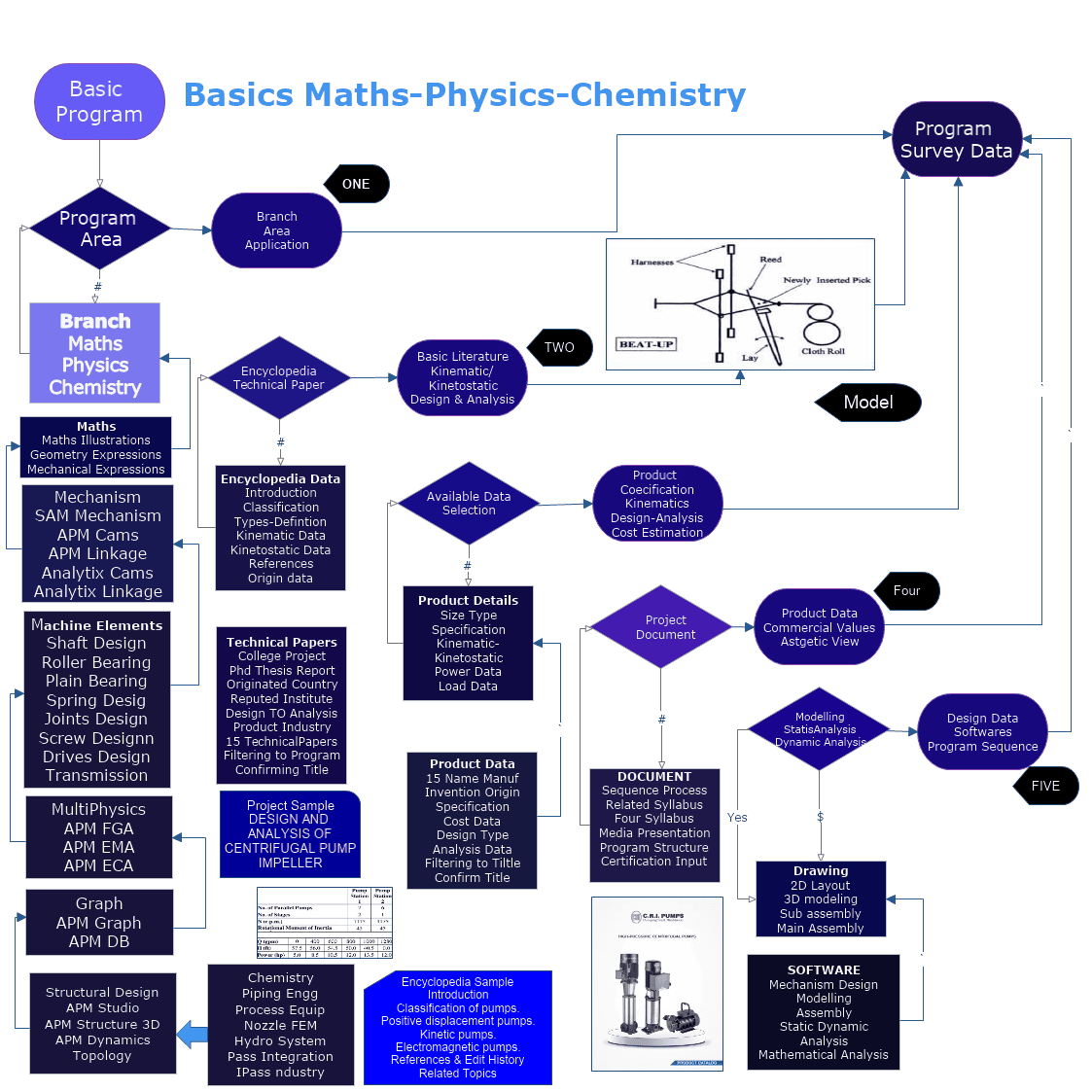
Women Graduates are trained with basics in Industry application from basic science Mathematics, Physics, Chemistry
Training in application Software by Industry Professional, to train others with preparation as TRAINER to empower.
Empowering areas are ACADEMIC SERVICE-ENTREPRENEURSHIP-DESIGN SERVICE-INDUSTRIES-SOCIAL ENGINEERING
Structural
Structural - Structural Structural Analysis
APM WinMachine, Structural - Structural Structural Analysis

APM WinMachine, Structural
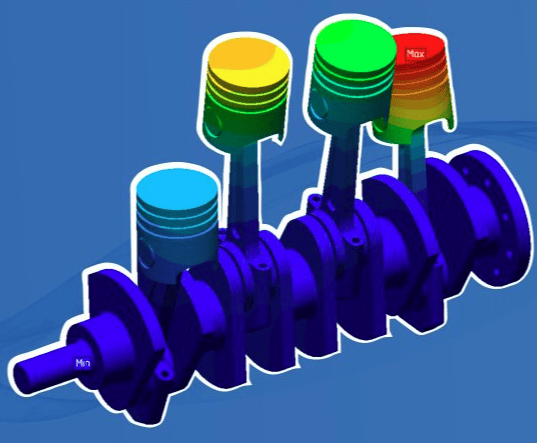
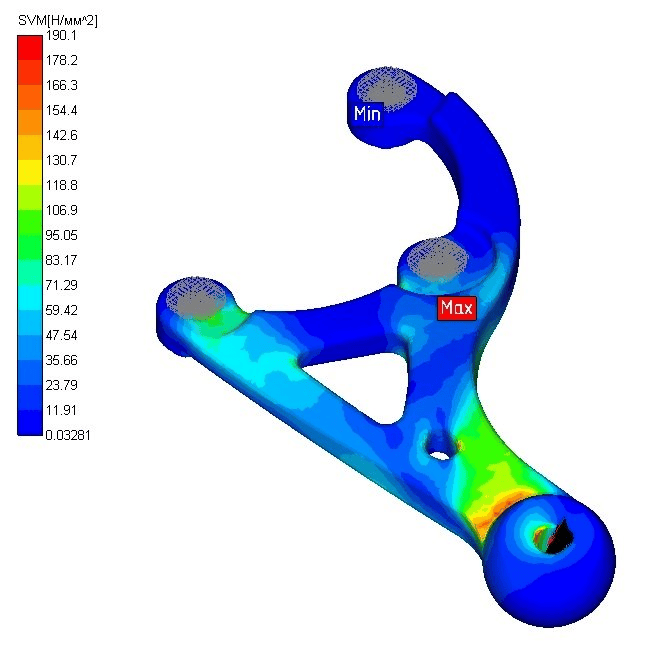
The APM WinMachine software product, Structural package (formerly APM StructFEM) allows you to analyze the stress-strain state (using the finite element method) of three-dimensional objects of any complexity under arbitrary clamping, static or dynamic (force or temperature) loading.
Finite element analysis tools allow you to prepare a structural model for analysis using rod (beam), plate, and solid finite elements. Finite element mesh can be built automatically or manually. In this case, the source geometry can be obtained from third-party CAD systems by importing STEP and SAT files.
The product also includes a specialized analysis module for analyzing connections in structures. This makes it possible to obtain information about the loading of the connection and select its optimal characteristics, for example, the minimum required diameters and number of bolts or rivets, legs and length of the weld, etc.
APM WinMachine, Structural configuration is designed for use in the following areas: automotive, nuclear, oil and gas, heavy and material handling engineering, railway transport, education (training of students of universities of technical specialties), etc.
In addition, in addition to the basic features, additional functionality (options) are available for the product:
- Thermo: calculation of non-stationary thermal conductivity; Non-linear: non-linear calculations; Composite: Analysis of Composite Structures;
- Fatigue: calculation of endurance; Harmonic: harmonic analysis; TopOpt: topological optimization;
- FGA liquid and gas flows, APM FGA; EMA Electromagnetic Fields APM EMA
The product is registered in the Register of Russian Computer Programs and Databases:
The computational core of the product – the APM Structure3D module – has an attestation passport of the software facility issued by ROSTEKHNADZOR, FBU "SEC NRS". License Cost
The price list of software product licenses is provided upon written request to the official e-mail address of com@apm.ru. The cost depends on the license type and license key option, as well as the configuration and bundling, if any.

APM Studio
The APM Studio module is included in the software products APM Multiphysics, APM WinMachine, APM Civil Engineering, APM StructFEM,APM FGA.APM Studio is designed to simulate and analyze the strength of various structures, as well as the analysis of fluid and gas flows. The module has a set of necessary own tools to perform all stages of problem solvin
APM Studio allows you to:
- create spatial models using three-dimensional geometric modeling tools;
- import geometry from third-party 3D editors;
- export geometry to third-party 3D editors.
Finite element mesh generation is carried out in automatic and semi-automatic modes. Preparing the model for analysis includes tools for specifying materials with characteristic properties and parameters, boundary and initial conditions, and visualizing them on the geometric model.
The calculations are based on the use of various mathematical models that numerically (by the finite element method) describe the corresponding physics of the processes. As a result, the user receives visualization of the analysis results in the form of contour and vector static maps, as well as in the form of animations of scalar and vector fields of characteristics, with the ability to generate text documents in the form of express reports.
APM WINMACHINE

he APM WinMachine software product, Multiphysics package (formerly APM Multiphysics) allows the user to solve various multiphysics problems for a more accurate assessment of the combined effect of processes of different physical nature on the object of calculation. This approach is undoubtedly necessary in the design of modern innovative equipment, which is subject to more and more stringent requirements.
The Multiphysics package includes finite element analysis tools for strength analysis, modules for engineering analysis of individual machine parts and assemblies, and specialized calculation modules for the analysis of multiphysics processes.
At the same time, the necessary interrelations are implemented in the product, which make it possible to perform complex calculations, for example, the analysis of the stress-strain state (SSS) taking into account the results of the calculation of thermal conductivity, as well as the analysis of SSS taking into account the flow of liquid or gas flows around the structure, etc.
The Multiphysics package includes all additional calculation options by default:
UNIT I
our Exmples from Text Book will be given trainingOn software listed For the program our problem will be given for self training with software to Trainee
With APM Studio, you can:
- linear analysis of solid solids;
- nonlinear analysis of solid SSS, including geometric and physical nonlinearities, large deformations, as well as contact interaction;
- analysis of frequencies and modes of natural oscillations of solids;
- analysis of the stability of solids;
- multi-cycle fatigue of solids;
- analysis of thermal conductivity of solids in stationary / non-stationary positions;
- analysis of filtration of currents through orthotropic porous medium in stationary/non-stationary productions;
- analysis of Stokes flows in stationary/non-stationary, isothermal/thermal, single-phase/two-phase formulations;
- analysis of Navier-Stokes flows in stationary, isothermal/thermal, laminar/turbulent setups.
isothermal/thermal setups.e
It is also possible to simulate a number of multiphysics problems:
- Thermal conductivity analysis and solid SSS analysis
- one-sided conjugate analysis of flows and solids, including conjugate analysis of heat transfer processes.
To solve a wider range of tasks, it is possible to export the analysis model to the APM Structure3D module.
APM Studio implements work with solid and surface parts, as well as assemblies based on them. For the calculation, it is necessary to generate a finite element mesh, which is carried out automatically.
FUNIT III
our Exmples from Text Book will be given trainingOn software listed For the program our problem will be given for self training with software to Trainee
Loads for the analysis of solid SSS:
- pressure, hydrostatic pressure;
- force concentrated, distributed over area/length, remote force;
- moment distributed over area/length;
- linear / angular acceleration;
- concentrated mass.
Fixings for the analysis of solid SSS:
- rigid in Cartesian coordinates;
- rigid in cylindrical coordinates;
- rigid by normal;
- elastic.
Boundary and initial conditions for the analysis of thermal conductivity of solids:
- temperature, initial temperature;
- heat flow to the body or surface;
- volumetric heat source, thermal point mass;
- fluid velocity;
- convection;
- radiation.
UNIT II
Four Exmples from Text Book will be given trainingOn software listed For the program our problem will be given for self training with software to Trainee
Options and settings when creating a mesh:
- triangular / quadrangular plane elements of the first order;
- first/second-order tetrahedrons;
- step constant / variable / adaptive;
- thickening / rarefaction in volume / on the surface;
- pre-split part/face/edge;
- semi-automatic "correction" of the grid;
- group splitting;
- joint grid.
To form links in assemblies, you can provide:
- contacts: rigid, sliding, gluing, beam, etc.;
- Connections: rigid, spherical joint, etc.

A Russian CAE system for computer-aided calculation and design of mechanical equipment and structures in the field of mechanical engineering, developed taking into account the latest achievements in computational mathematics, the field of numerical methods and programming, as well as theoretical and experimental engineering solutions.
A distinctive feature of APM WinMachine is the vertically integrated structure of the product layout, which allows developers to organize seamless links between calculation modules to solve complex production problems.
UNIT IV
Four Exmples from Text Book will be given trainingOn software listed For the program our problem will be given for self training with software to Trainee
Boundary and initial conditions for fluid and gas flow analysis:
- pressure, initial pressure;
- velocity, muzzle velocity;
- consumption;
- acceleration;
- turbulence;
- temperature, initial temperature;
- heat flow;
- thermal convection;
- thermal radiation;
- volume fraction;
- velocity potential.
Processor (solver) capabilities:
- numerical methods have been implemented taking into account arbitrary geometry, with arbitrary physical properties of materials and boundary conditions;
- methods for solving SLAU in the form of both direct and iterative procedures were implemented;
- numerical methods using parallel computing technologies have been implemented;
- the possibility of solving problems with a dimension of more than 10 million degrees of freedom is supported;
- Different settings and options for each of the supported analysis types.
Structural
Structural - Structural Structural Analysis
APM WinMachine, Structural - Structural Structural Analysis
APM WinMachine, Structural
The APM WinMachine software product, Structural package (formerly APM StructFEM) allows you to analyze the stress-strain state (using the finite element method) of three-dimensional objects of any complexity under arbitrary clamping, static or dynamic (force or temperature) loading.
Finite element analysis tools allow you to prepare a structural model for analysis using rod (beam), plate, and solid finite elements. Finite element mesh can be built automatically or manually. In this case, the source geometry can be obtained from third-party CAD systems by importing STEP and SAT files.
The product also includes a specialized analysis module for analyzing connections in structures. This makes it possible to obtain information about the loading of the connection and select its optimal characteristics, for example, the minimum required diameters and number of bolts or rivets, legs and length of the weld, etc.
APM WinMachine, Structural configuration is designed for use in the following areas: automotive, nuclear, oil and gas, heavy and material handling engineering, railway transport, education (training of students of universities of technical specialties), etc.
In addition, in addition to the basic features, additional functionality (options) are available for the product:
- Thermo: calculation of non-stationary thermal conductivity; Non-linear: non-linear calculations; Composite: Analysis of Composite Structures;
- Fatigue: calculation of endurance; Harmonic: harmonic analysis; TopOpt: topological optimization;
- FGA liquid and gas flows, APM FGA; EMA Electromagnetic Fields APM EMA
The product is registered in the Register of Russian Computer Programs and Databases:
The computational core of the product – the APM Structure3D module – has an attestation passport of the software facility issued by ROSTEKHNADZOR, FBU "SEC NRS". License Cost
The price list of software product licenses is provided upon written request to the official e-mail address of com@apm.ru. The cost depends on the license type and license key option, as well as the configuration and bundling, if any.
APM Structure3D
APM Structure3D Finite Element Analysis Engine
The APM Structure3D module is the basic computational core of the APM range. It has a wide range of capabilities for creating structural models, performing the necessary calculations and visualizing the results obtained. The use of these capabilities will reduce the design time and material consumption of the facility, as well as reduce the cost of design work
The APM Structure3D module is designed for comprehensive analysis of three-dimensional free-form structures. With its help, it is possible to perform the strength analysis of arbitrarily fixed models using the finite element method, including rod, thin plate and volumetric solid structural elements (including assemblies), as well as ropes and arbitrary combinations of all the elements listed above. The initial elastic-strain characteristics of the elements can be linear, as well as geometrically and physically nonlinear.
Analysis of the results obtained and subsequent modification allows you to choose the best design solutions that are optimal in weight and cost.
APM WINMACHINE
he APM WinMachine software product, Multiphysics package (formerly APM Multiphysics) allows the user to solve various multiphysics problems for a more accurate assessment of the combined effect of processes of different physical nature on the object of calculation. This approach is undoubtedly necessary in the design of modern innovative equipment, which is subject to more and more stringent requirements.
The Multiphysics package includes finite element analysis tools for strength analysis, modules for engineering analysis of individual machine parts and assemblies, and specialized calculation modules for the analysis of multiphysics processes.
At the same time, the necessary interrelations are implemented in the product, which make it possible to perform complex calculations, for example, the analysis of the stress-strain state (SSS) taking into account the results of the calculation of thermal conductivity, as well as the analysis of SSS taking into account the flow of liquid or gas flows around the structure, etc.
The Multiphysics package includes all additional calculation options by default:
Additional features:
- off-center connection of the rod elements of the structural model;
- swivel connection of structural elements;
- release of the ties of the core element in the node;
- setting joint movements;
- Import/export of finite element mesh (BDF/DAT, SFM);
- introduction of a local coordinate system in the node;
- Calculation of torsion in rod elements;
- Interactive semi-automatic finite element splitting;
- availability of the operation of generation of metal structure units.
With APM Structure 3D, you can:
- fully or partially prepare the geometric model of the metal structure, using the libraries of the most common standard schemes, check the bearing capacity and automatically select the optimal cross-section of the bar element (according to the criteria of strength and stability, as well as in accordance with the requirements of SNiP II-23-81*) from the library of standard sections or from the library prepared by the user;
- automatically receive drawings of standard joints of metal structures;
- to carry out the calculation of welds of nodal elements, as well as the calculation of group bolted connections;
- prepare projection drawings of the model of the structure as a whole and its individual parts;
- Get the consumption table (by material and profiles) by element.
UNIT I
our Exmples from Text Book will be given trainingOn software listed For the program our problem will be given for self training with software to Trainee
Finite Element Types
You can use the following types of finite elements when you create a model of a building object:
- stern – of arbitrary cross-sections;
- flexible elements – ropes;
- lamellar – triangular and quadrangular;
- shell;
- solid – isoparametric four-node, six-node and eight-node;
- Special elements: elastic bonds, elastic supports, contact elements, concentrated masses and moments of inertia.
Loads and impacts
- concentrated forces and moments (constant and variable in time);
- distributed loads by length, area and volume (constant and variable in time);
- loads specified by linear and/or angular displacement (constant and variable in time);
- snow, wind and seismic (according to SNiP), taking into account distributed and concentrated masses, linear and rotational degrees of freedom;
- hydrostatic pressure;
- contact-type pressure;
- Design Force Combinations (DCS);
- centrifugal (given by linear and/or angular acceleration);
- gravitational;
- temperature gradients;
- To simulate the actual loading of a structural model, it is possible to use arbitrary combinations of the loads listed above.
It is also possible to simulate a number of multiphysics problems:
- Thermal conductivity analysis and solid SSS analysis
- one-sided conjugate analysis of flows and solids, including conjugate analysis of heat transfer processes.
To solve a wider range of tasks, it is possible to export the analysis model to the APM Structure3D module.
APM Studio implements work with solid and surface parts, as well as assemblies based on them. For the calculation, it is necessary to generate a finite element mesh, which is carried out automatically.
FUNIT III
our Exmples from Text Book will be given trainingOn software listed For the program our problem will be given for self training with software to Trainee
The results of the calculations are:
- distribution of equivalent stresses and their components, as well as principal stresses;
- distribution of linear, angular and total displacements;
- distribution of deformations among structural elements;
- maps of distribution and plots of internal efforts;
- distribution of forces in the contact zone;
- safety margin coefficient and form of loss of stability;
- Distribution of safety factors and number of cycles according to the criterion of fatigue strength;
- distribution of safety coefficients according to the criteria of yield and strength;
- distribution of temperature fields and thermal stresses;
- center of gravity coordinates, weight, volume, surface area, moments of inertia of the model, as well as moments of inertia, static moments, and cross-sectional areas;
- reactions in supports, as well as the total reactions reduced to the center of gravity of the structural model.
Important: the initial data and calculation results can be displayed in a *.rtf test file suitable for subsequent editing.
You can use the following types of finite elements when you create a model of a building object:
- stern – of arbitrary cross-sections;
- flexible elements – ropes;
- lamellar – triangular and quadrangular;
- shell;
- solid – isoparametric four-node, six-node and eight-node;
- Special elements: elastic bonds, elastic supports, contact elements, concentrated masses and moments of inertia.
UNIT II
Four Exmples from Text Book will be given trainingOn software listed For the program our problem will be given for self training with software to Trainee
APM Structure3D Module Functionality
UI
- off-center connection of the rod elements of the structural model;
- swivel connection of structural elements;
- release of the ties of the core element in the node;
- setting joint movements;
- Import/export of finite element mesh (BDF/DAT, SFM);
- introduction of a local coordinate system in the node;
- Calculation of torsion in rod elements;
- Interactive semi-automatic finite element splitting;
- availability of the operation of generation of metal structure units.
Dynamic Analysis
- determination of frequencies and modes of natural oscillations, including those with preloading;
- calculation of forced oscillations – determination of the behavior of the system under a given law of change of the forcing load over time with animation of the oscillatory process;
- Calculation for vibration of the bases.
A Russian CAE system for computer-aided calculation and design of mechanical equipment and structures in the field of mechanical engineering, developed taking into account the latest achievements in computational mathematics, the field of numerical methods and programming, as well as theoretical and experimental engineering solutions.
A distinctive feature of APM WinMachine is the vertically integrated structure of the product layout, which allows developers to organize seamless links between calculation modules to solve complex production problems.
UNIT IV
Four Exmples from Text Book will be given trainingOn software listed For the program our problem will be given for self training with software to Trainee
Loads and impacts:
- concentrated forces and moments (constant and variable in time);
- distributed loads by length, area and volume (constant and variable in time);
- loads specified by linear and/or angular displacement (constant and variable in time);
- snow, wind and seismic (according to SNiP), taking into account distributed and concentrated masses, linear and rotational degrees of freedom;
- hydrostatic pressure;
- contact-type pressure;
- Design Force Combinations (DCS);
- centrifugal (given by linear and/or angular acceleration);
- gravitational;
- temperature gradients.
Important: To simulate the actual loading of a structural model, it is possible to use arbitrary combinations of the loads listed above.
APM Structure3D Finite Element Analysis Engine
Structural
Structural - Structural Structural Analysis
APM WinMachine, Structural - Structural Structural Analysis
APM WinMachine, Structural
The APM WinMachine software product, Structural package (formerly APM StructFEM) allows you to analyze the stress-strain state (using the finite element method) of three-dimensional objects of any complexity under arbitrary clamping, static or dynamic (force or temperature) loading.
Finite element analysis tools allow you to prepare a structural model for analysis using rod (beam), plate, and solid finite elements. Finite element mesh can be built automatically or manually. In this case, the source geometry can be obtained from third-party CAD systems by importing STEP and SAT files.
The product also includes a specialized analysis module for analyzing connections in structures. This makes it possible to obtain information about the loading of the connection and select its optimal characteristics, for example, the minimum required diameters and number of bolts or rivets, legs and length of the weld, etc.
APM WinMachine, Structural configuration is designed for use in the following areas: automotive, nuclear, oil and gas, heavy and material handling engineering, railway transport, education (training of students of universities of technical specialties), etc.
In addition, in addition to the basic features, additional functionality (options) are available for the product:
- Thermo: calculation of non-stationary thermal conductivity; Non-linear: non-linear calculations; Composite: Analysis of Composite Structures;
- Fatigue: calculation of endurance; Harmonic: harmonic analysis; TopOpt: topological optimization;
- FGA liquid and gas flows, APM FGA; EMA Electromagnetic Fields APM EMA
The product is registered in the Register of Russian Computer Programs and Databases:
The computational core of the product – the APM Structure3D module – has an attestation passport of the software facility issued by ROSTEKHNADZOR, FBU "SEC NRS". License Cost
The price list of software product licenses is provided upon written request to the official e-mail address of com@apm.ru. The cost depends on the license type and license key option, as well as the configuration and bundling, if any.

APM Dynamics
APM Dynamics is a product designed to solve the problems of modeling the dynamics of spatial mechanical systems using the finite element method (FEA).
The use of FEA made it possible to abandon the representation of dynamical systems in the form of absolutely rigid bodies, as it is assumed in classical mechanics, and to take into account the elastic properties of these bodies.
The geometry of mechanical system elements is created using a modern three-dimensional graphic editor, which includes both geometric modeling tools and tools for setting boundary conditions and sensors for recording the necessary output parameters.
The formation of a dynamic model is carried out in the form of one-, two-, three- and n-mass systems (n is an arbitrary integer) and systems with distributed masses.
APM WINMACHINE
he APM WinMachine software product, Multiphysics package (formerly APM Multiphysics) allows the user to solve various multiphysics problems for a more accurate assessment of the combined effect of processes of different physical nature on the object of calculation. This approach is undoubtedly necessary in the design of modern innovative equipment, which is subject to more and more stringent requirements.
The Multiphysics package includes finite element analysis tools for strength analysis, modules for engineering analysis of individual machine parts and assemblies, and specialized calculation modules for the analysis of multiphysics processes.
At the same time, the necessary interrelations are implemented in the product, which make it possible to perform complex calculations, for example, the analysis of the stress-strain state (SSS) taking into account the results of the calculation of thermal conductivity, as well as the analysis of SSS taking into account the flow of liquid or gas flows around the structure, etc.
The Multiphysics package includes all additional calculation options by default:
UNIT I
our Exmples from Text Book will be given trainingOn software listed For the program our problem will be given for self training with software to Trainee
Simulation of Dynamics of Inelastic Mechanical Systems
New algorithms have been developed to simulate the dynamics of inelastic mechanical systems. Equations of motion are effectively solved by the method of decomposition by eigenforms, which has the following capabilities:
- ensures acceptable accuracy of calculations;
- allows you to solve problems of large dimensions;
- reduces the calculation time to achieve the appropriate accuracy compared to known solutions, such as the direct integration method (Wilson method), etc.
FUNIT III
our Exmples from Text Book will be given trainingOn software listed For the program our problem will be given for self training with software to Trainee
Important: the initial data and calculation results can be displayed in a *.rtf test file suitable for subsequent editing.
APM Dynamics includes the following tools:
- A preprocessor for describing the geometry of the model, including procedures for setting boundary conditions imposed on nodal points;
- Preprocessor for setting the laws of motion of the leading links and force factors acting on the elements of the mechanical system (components of spatial forces and moments);
- Tools for specifying flight masses for a more accurate description of the inertial properties of spatial mechanisms;
- A solver who implements the proposed methods for solving dynamic problems;
- Postprocessor for visualization and printing of the results of calculating linear and angular displacements, linear and angular velocities and accelerations, trajectories of arbitrary points of the structure model, current force factors acting on the elements of the mechanical system;
- Mechanisms of animation representation of the movement of system elements in three-dimensional space;
- Tools and formats for transferring data, including dynamic load values, to the APM Structure3D strength analysis module.
UNIT II
Four Exmples from Text Book will be given trainingOn software listed For the program our problem will be given for self training with software to Trainee
The proposed numerical approaches made it possible to satisfactorily describe the transient processes that take place in the motion of mechanisms and machines, which cannot be achieved with the traditional representation of dynamic objects in the form of absolutely rigid bodies.
The implemented solutions make it possible to correctly describe the laws of motion in three-dimensional spe of both spatial mechanisms and arbitrary mechanical systems.
A Russian CAE system for computer-aided calculation and design of mechanical equipment and structures in the field of mechanical engineering, developed taking into account the latest achievements in computational mathematics, the field of numerical methods and programming, as well as theoretical and experimental engineering solutions.
A distinctive feature of APM WinMachine is the vertically integrated structure of the product layout, which allows developers to organize seamless links between calculation modules to solve complex production problems.
UNIT IV
Four Exmples from Text Book will be given trainingOn software listed For the program our problem will be given for self training with software to Trainee
- Review UNIT I/II/III
Structural
Structural - Structural Structural Analysis
APM WinMachine, Structural - Structural Structural Analysis
APM WinMachine, Structural
The APM WinMachine software product, Structural package (formerly APM StructFEM) allows you to analyze the stress-strain state (using the finite element method) of three-dimensional objects of any complexity under arbitrary clamping, static or dynamic (force or temperature) loading.
Finite element analysis tools allow you to prepare a structural model for analysis using rod (beam), plate, and solid finite elements. Finite element mesh can be built automatically or manually. In this case, the source geometry can be obtained from third-party CAD systems by importing STEP and SAT files.
The product also includes a specialized analysis module for analyzing connections in structures. This makes it possible to obtain information about the loading of the connection and select its optimal characteristics, for example, the minimum required diameters and number of bolts or rivets, legs and length of the weld, etc.
APM WinMachine, Structural configuration is designed for use in the following areas: automotive, nuclear, oil and gas, heavy and material handling engineering, railway transport, education (training of students of universities of technical specialties), etc.
In addition, in addition to the basic features, additional functionality (options) are available for the product:
- Thermo: calculation of non-stationary thermal conductivity; Non-linear: non-linear calculations; Composite: Analysis of Composite Structures;
- Fatigue: calculation of endurance; Harmonic: harmonic analysis; TopOpt: topological optimization;
- FGA liquid and gas flows, APM FGA; EMA Electromagnetic Fields APM EMA
The product is registered in the Register of Russian Computer Programs and Databases:
The computational core of the product – the APM Structure3D module – has an attestation passport of the software facility issued by ROSTEKHNADZOR, FBU "SEC NRS". License Cost
The price list of software product licenses is provided upon written request to the official e-mail address of com@apm.ru. The cost depends on the license type and license key option, as well as the configuration and bundling, if any.
TopOpt: Topological Optimization
The TopOpt option is an additional feature of the APM Structure3D finite element core, which is the basis of such software products as APM WinMachine andAPM Civil Engineering. The option is registered in the Register of Russian Computer Programs and Databases. For a user manual, see Chapter 11 of the APM Structure3D documentation.
The modern approach to design involves the effective use of materials in the structure. Weight reduction allows you to achieve better energy efficiency and environmental friendliness of products, reduce their transportation and operating costs.
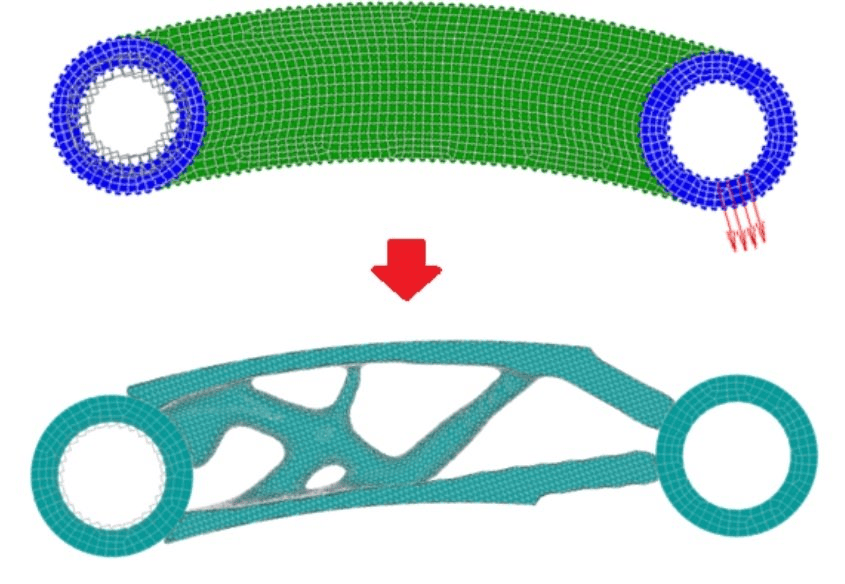
Topological optimization (MOT) is a computer-aided design method that allows you to obtain the optimal shape of the product under specified operating conditions. The introduction of this tool into the development process allows you to reduce the time allotted for this stage of the product life cycle, to make wider use of the capabilities of both traditional manufacturing methods and additive technologies.
The cost of the license of the Software Product option is provided upon written request to the official e-mail address of com@apm.ru. The cost depends on the license type and license key option, as well as the configuration and bundling, if any.
APM WINMACHINE
he APM WinMachine software product, Multiphysics package (formerly APM Multiphysics) allows the user to solve various multiphysics problems for a more accurate assessment of the combined effect of processes of different physical nature on the object of calculation. This approach is undoubtedly necessary in the design of modern innovative equipment, which is subject to more and more stringent requirements.
The Multiphysics package includes finite element analysis tools for strength analysis, modules for engineering analysis of individual machine parts and assemblies, and specialized calculation modules for the analysis of multiphysics processes.
At the same time, the necessary interrelations are implemented in the product, which make it possible to perform complex calculations, for example, the analysis of the stress-strain state (SSS) taking into account the results of the calculation of thermal conductivity, as well as the analysis of SSS taking into account the flow of liquid or gas flows around the structure, etc.
The Multiphysics package includes all additional calculation options by default:
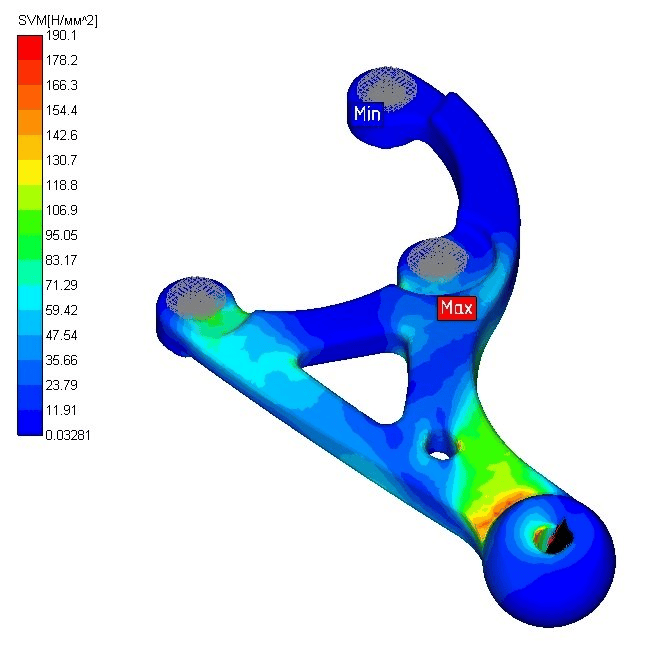
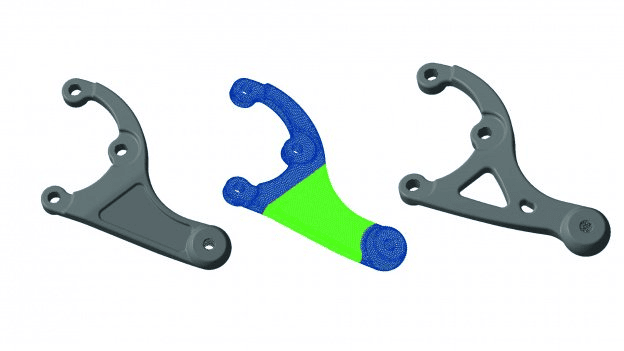
Weight minimization is a popular statement of the problem of topological optimization, which allows you to achieve the lightest structures, taking into account the strength properties of the part material, available for three-dimensional and two-dimensional finite elements. The algorithm works on the basis of a nonlinear optimization module, thanks to which it is also possible to take into account volumetric forces and technological limitations.
UNIT I
our Exmples from Text Book will be given trainingOn software listed For the program our problem will be given for self training with software to Trainee
Topological Optimization in APM Products
Topological optimization has been available in the APM software package since version 15 and its functionality is constantly expanding. The very first to be implemented was the most popular formulation of the problem of finding a structure of maximum rigidity using the "optimal criterion" method.
Since version 16, thanks to the introduction of a nonlinear optimizer, it has become possible to search for a minimum weight design taking into account permissible stresses, the ability to take into account volumetric loads (such as dead weight, acceleration, etc.) and the ability to apply technological constraints (symmetry, stamping, maximum thickness of part elements). The system now has functionality for post-processing maintenance results.
A Russian CAE system for computer-aided calculation and design of mechanical equipment and structures in the field of mechanical engineering, developed taking into account the latest achievements in computational mathematics, the field of numerical methods and programming, as well as theoretical and experimental engineering solutions.
A distinctive feature of APM WinMachine is the vertically integrated structure of the product layout, which allows developers to organize seamless links between calculation modules to solve complex production problems.
FUNIT III
our Exmples from Text Book will be given trainingOn software listed For the program our problem will be given for self training with software to Trainee
Topological optimization in the APM environment
The implementation of topological optimization in APM is based on the combination of optimization methods and the finite element method. The main steps in solving the optimization problem are listed below.
The user needs to create a prototype of the design. For this purpose, it is necessary to take into account all possible operating loads, which can be represented as load cases.
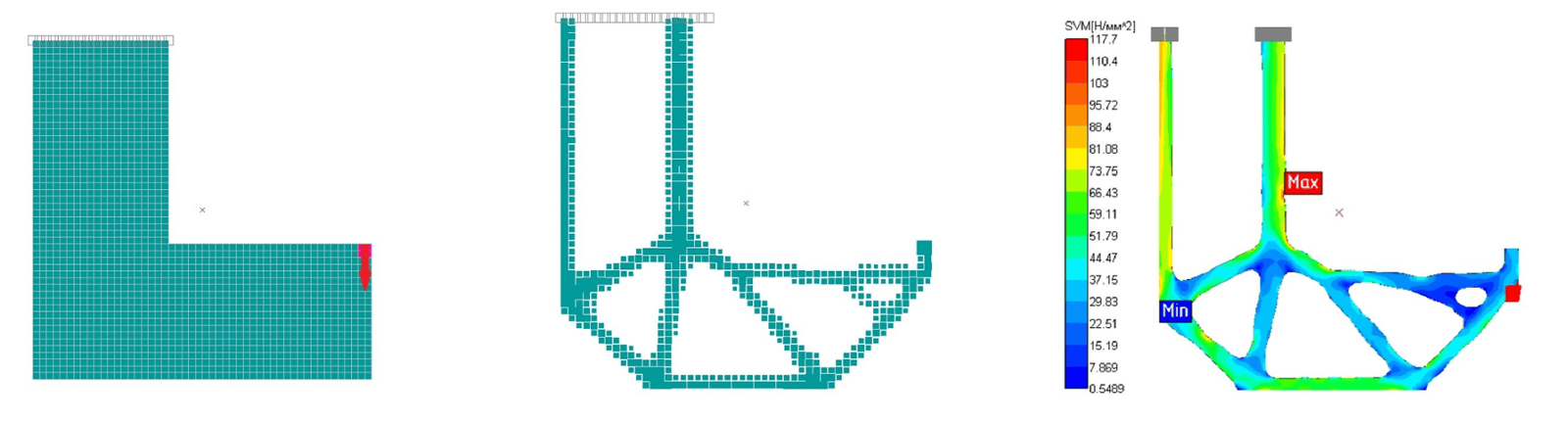
Next, the design space is set, each element of which corresponds to a design variable, its value equal to 0 corresponds to the absence of material, and 1 - to the complete filling of material in this finite element, this allows you to form an optimization problem, as well as take into account technological limitations.
The last step is to choose a problem statement or form it yourself and start the calculation.
After the calculations, post-processing, verification calculations and interpretation of the optimization results are carried out.
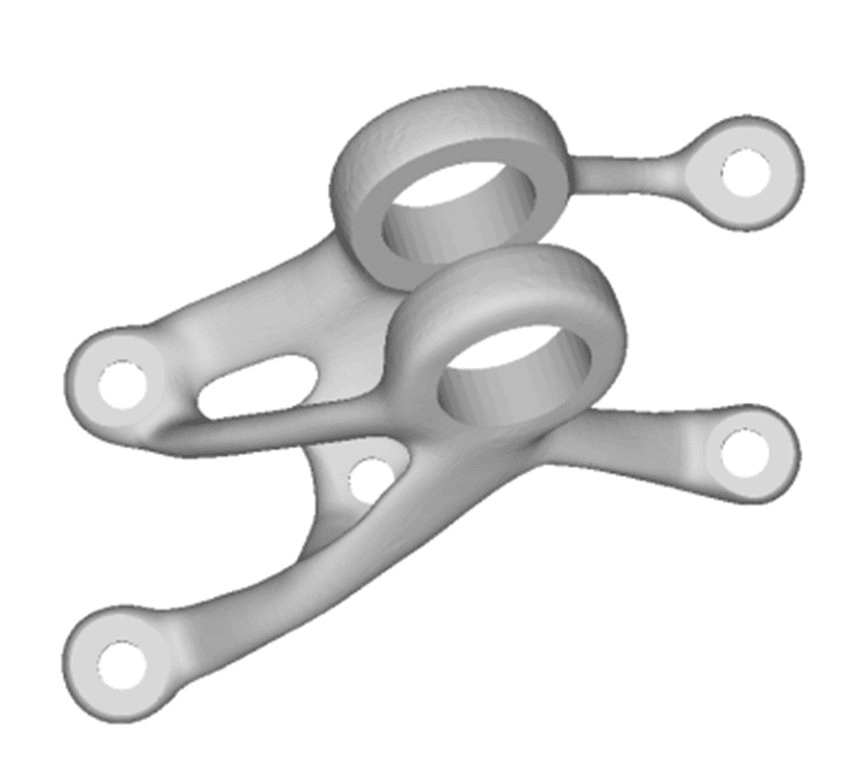
Post-processing is designed to allow for verification analysis and further work with the model obtained using topological design optimization. Post-processing creates a completely new, smoothed surface mesh, as well as a three-dimensional tetrahedral mesh, in place of the design space.
UNIT II
Four Exmples from Text Book will be given trainingOn software listed For the program our problem will be given for self training with software to Trainee
Since version 17, the user has the opportunity to create an optimization task on his own, setting the target function and various constraints, which are formed from the following system responses:
- Moving a node;
- Mutual displacement of two nodes;
- Volume/weight of the product;
- Rigidity;
- Cell voltage;
- Tension of a group of elements;
- Reaction in support.
New technological constraints have been implemented:
- Obtaining self-supporting structures, extrusion and some of them have become available for optimization according to the optimal criterion method, which allows you to significantly reduce the number of iterations required to find a solution;
- Volume load accounting is now available for all types of elements and all responses;
- post-processing for wafers.
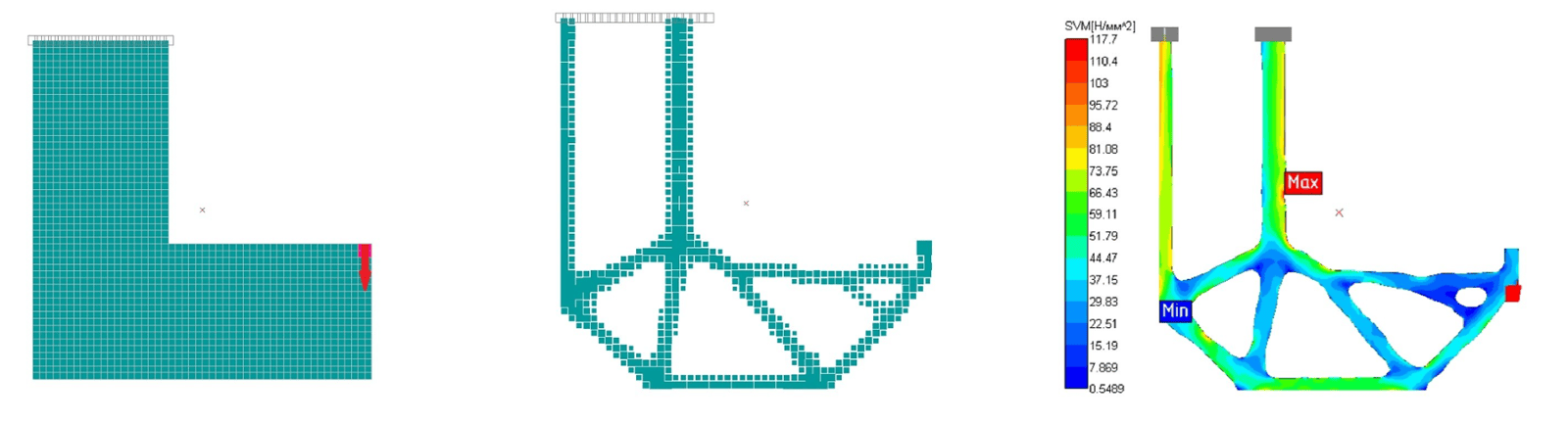
Stiffness maximization is the most popular and fastest method for solving the optimization problem, however, it does not take into account the strength properties of the structure, it is available for all types of finite elements in APM. In version 16, it is possible to solve this problem using two algorithms - the "optimal criterion" method and using a more advanced nonlinear optimization module. In the second option, you can take into account volumetric forces and technological limitations.
Physics Application Program